
Gin, not the one you're thinking of!
Gin is a popular Go framework that’s fast and efficient—making it a great choice for building scalable web applications. It's simple and easy to use, making the code not look magic but rather straightforward.
About Gin 🍸
- It's lightweight, highly performant, and easy to use.
- It's built on top of the standard Go's net/http package.
- It's fast because it has minimal overhead.
- Out of the box support for JSON parsing and generation makes it easy to work with JSON data.
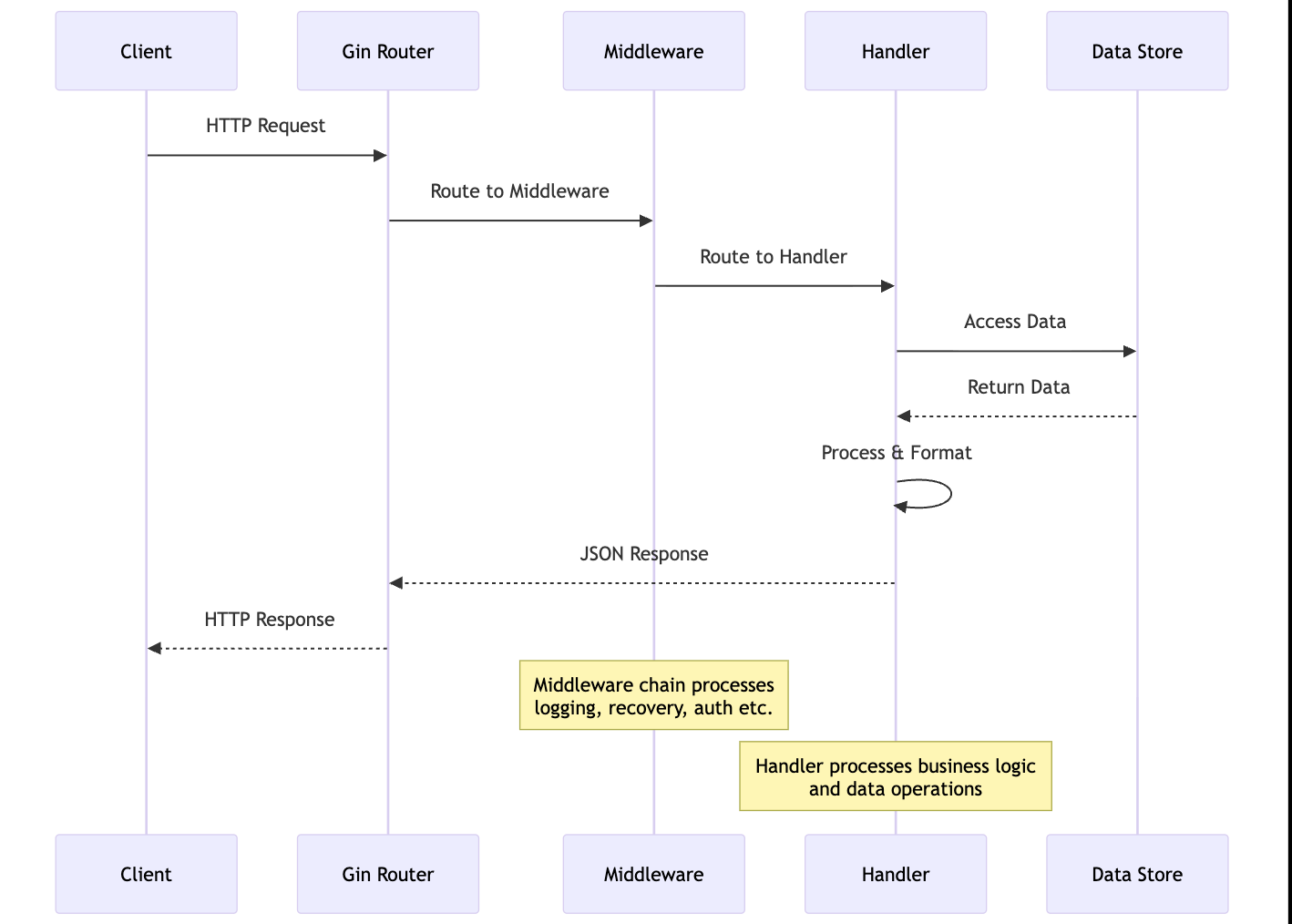
- Building on top of middleware is straightforward, allowing you to add features like logging, authentication, and more.
Specific to Gin~
gin.Default(): Creates a new Gin router with default middleware (logging and recovery).The recovery middleware catches panics and returns a 500 error, ensuring your server stays running.
context.BindJSON(&struct): Binds incoming JSON request bodies to a Go struct, with automatic validation and error handling.context.Param(key): Retrieves path parameters (e.g. :id in /todos/:id).context.Query(key): Extracts query parameters from the URL (e.g., ?query=example).router.Run(address): Starts the HTTP server on the specified address (e.g., localhost:8080).router.[HTTPMethod](path, handler): Defines a route for a specific HTTP method and path. For example, router.GET("/todos", getTodos).
Creating your first server with Gin 🚀
1. Setup project
We’ll build a RESTful API to manage a todo list stored in memory. The API will support the following endpoints:
- GET /todos: Retrieve all todos, with optional filtering by query or status.
- POST /todos: Create a new todo
- GET /todos/:id: Retrieve a specific todo by its ID
- PATCH /todos/:id: Toggles the completed status of a todo
- DELETE /todos/:id: Delete a specific todo by its ID
Let's dive in!
Before writing code, ensure you have Go installed on your system. Create a new directory for your project, initialize a Go module, and install the Gin package.
~ $ mkdir todo-api

~ $ cd todo-api

~/todo-api $ go mod init todo-api

~/todo-api $ go get github.com/gin-gonic/gin
This sets up a Go module named todo-api and installs the Gin framework.
2. Getting Gin up and running
Let’s start with a minimal Gin server to test the setup. Create a file named main.go:
package main

import (
    "github.com/gin-gonic/gin"
    "net/http"
)

func main() {
    router := gin.Default()

    router.GET("/todos", func(c *gin.Context) {
        c.IndentedJSON(http.StatusOK, gin.H{"message": "Hello, World!"})
    })

    router.Run("localhost:8080") // This starts the server on port 8080 locally
}
Run the server using the following command:
~/todo-api $ go run main.go
Open your browser and navigate to http://localhost:8080/todos. You should see the following output:
{
    "message": "Hello, World!"
}
This confirms that Gin is set up correctly!
The
gin.Default()function initializes the router with logging and recovery middleware, and router. Run starts the server.
3. Define the Todo Model and In-Memory Store
package main

import (
    "errors"
    "net/http"
    "strings"
    "github.com/gin-gonic/gin"
)

// Todo represents a todo item
type Todo struct {
    ID        string `json:"id"`
    Item      string `json:"item"`
    Completed bool   `json:"completed"`
}

// In-memory store for todos
var TODOS = []Todo{
    {ID: "1", Item: "Learn Go", Completed: false},
    {ID: "2", Item: "Build an API", Completed: false},
}
The Todo struct uses JSON tags to map fields to JSON keys.
4. Helper Functions
- Case-insensitive string search: This function checks if a substr is present in the str, ignoring case.
func containsIgnoreCase(str, substr string) bool {
    return strings.Contains(strings.ToLower(str), strings.ToLower(substr))
}
- Retrieve a todo by ID: This function searches the TODOS slice for a todo with the given ID.
func getTodoById(id string) (*Todo, error) {
    for i := range TODOS {
        if TODOS[i].ID == id {
            return &TODOS[i], nil
        }
    }
    return nil, errors.New("todo not found")
}
5. Writing the API Endpoints
5.1 GET /todos
This endpoint retrieves all todos, with optional filtering by a query (search term) or status (completed or not).
func getTodos(context *gin.Context) {
    var filtered []Todo

    // Filter by query parameters logic here

    context.IndentedJSON(http.StatusOK, filtered)
}
The
getTodos()function retrieves all todos from the TODOS slice and returns them as a JSON response. To get todos based on a query or status, you can add logic to filter the todos based on the query parameters. Refer to the example implemented in the complete code.
5.2 GET /todos/:id
This endpoint retrieves a specific todo by its ID.
func getTodo(context *gin.Context) {
    id := context.Param("id")
    todo, err := getTodoById(id)

    if err != nil {
        context.IndentedJSON(http.StatusNotFound, gin.H{"message": "Todo not found"})
        return
    }

    context.IndentedJSON(http.StatusOK, todo)
}
5.3 POST /todos
This endpoint creates a new todo in the in-memory list.
func addTodo(context *gin.Context) {
    var newTodo Todo

    if err := context.BindJSON(&newTodo); err != nil {
        context.IndentedJSON(http.StatusBadRequest, gin.H{"error": err.Error()})
        return
    }


    TODOS = append(TODOS, newTodo)

    context.IndentedJSON(http.StatusCreated, newTodo)
}
Test with curl
curl -X POST http://localhost:8080/todos -H "Content-Type: application/json" -d '{"id":"3","item":"Test API","completed":false}'
To check the Update and Delete endpoints, you can refer to the complete code.
Request Handling - Behind the Scenes 🎬
TL;DR:
- Gin is a popular web framework for Go that provides a simple and efficient way to build web applications.
- It is built on top of the standard Go HTTP server and provides a powerful routing system that handles complex URLs, path parameters effortlessly.
- It provides a robust middleware system that allows to easily build features like logging, authentication, rate limiting into the request-response cycle.
- Gin supports JSON parsing and generation out of the box, making it easy to work with JSON data. JSON is quite common pattern in RESTful APIs and Gin provides convenient ways to handle it.
- It leverages Go's concurrency model (goroutines) to handle concurrent requests efficiently and scale applications horizontally to manage high traffic loads.
- The example provided demonstrates how to create a simple RESTful API using Gin to manage a list of todos in memory, with endpoints for retrieving, adding, updating, and deleting todos.
- Learn more about Gin from the Documentation.